Template
HTML report template
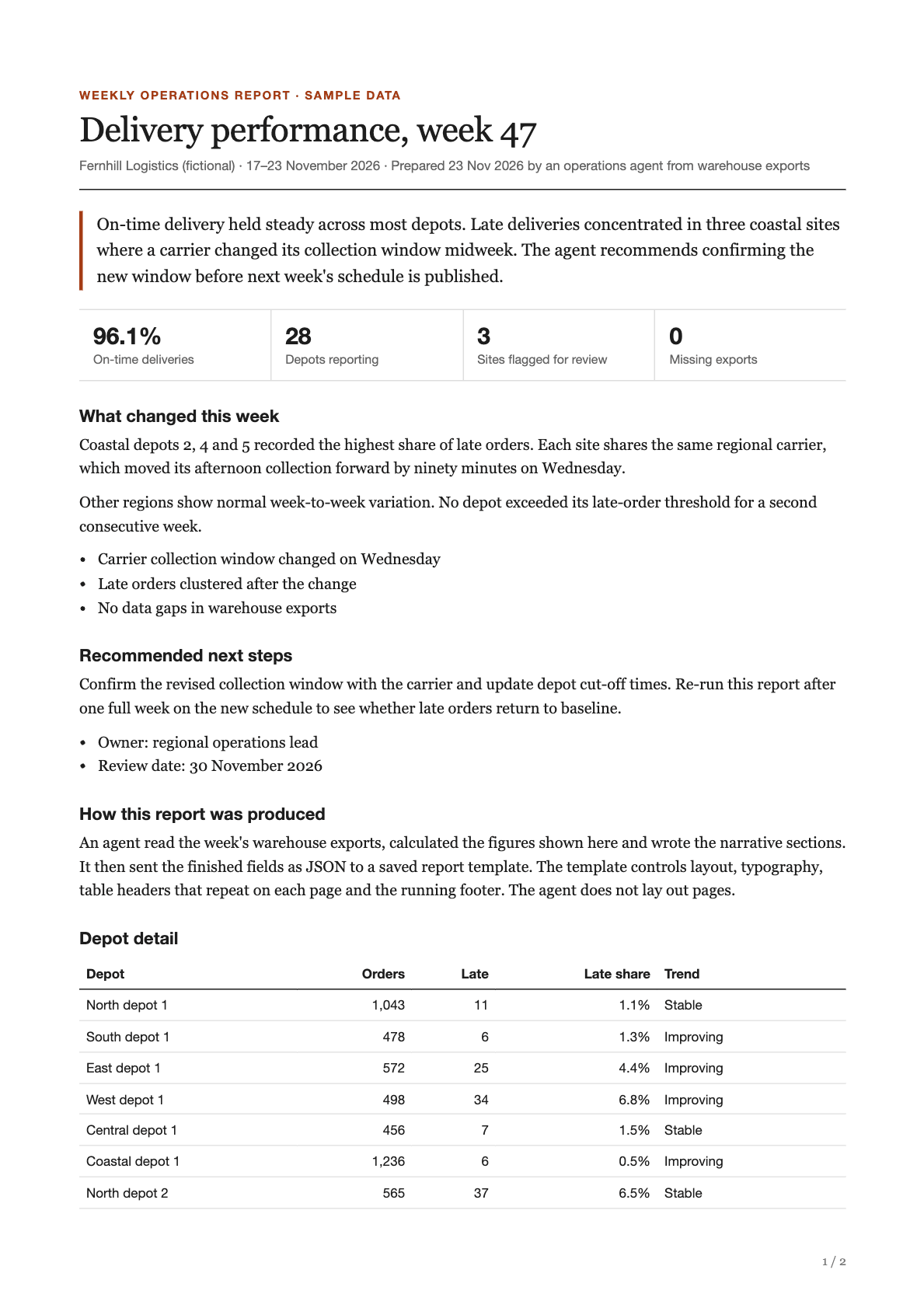
A print-first report: summary, key figures, narrative sections written by a person, a script or an agent, and a detail table that continues across pages. Send it as HTML with your data, or save it in the app and call it by ID.
Files
Template, data and output
Download the exact files behind the preview. Send template.html with data.json straight to the API, save the template in the app to adapt it, or use the files as test fixtures with any renderer.
Sample outputs were rendered from these files with headless Chromium for documentation. All names and figures are fictional.
template.html — page rules and sections
<style>
  @page { size: A4; margin: 20mm 18mm 22mm; }
  @page {
    @bottom-left  { content: "{{organization}} · {{period}}"; }
    @bottom-right { content: counter(page) " / " counter(pages); }
  }
  @page :first { @bottom-left { content: none; } }
  h2 { break-after: avoid; }
</style>

{{#each sections}}
  <h2>{{heading}}</h2>
  {{#each paragraphs}}<p>{{this}}</p>{{/each}}
  {{#if bullets}}<ul>{{#each bullets}}<li>{{this}}</li>{{/each}}</ul>{{/if}}
{{/each}}
Data contract
Fields the template expects
Values arrive as already-formatted strings: your system, script or agent calculates figures, totals and dates, and the template lays them out. The same data works whether you send the HTML or call a saved template.
| Field | Type | Required | Notes |
|---|---|---|---|
| reportType | string | Yes | Small kicker above the title. |
| title | string | Yes | Report title; also the document title. |
| organization / period | string | Yes | Shown in the byline and the running footer. |
| preparedOn / preparedBy | string | Yes | Who or what produced the report, e.g. an agent. |
| summary | string | Yes | Two to four sentences; rendered as the lead paragraph. |
| metrics[] | object[] | Yes | value and label; four fit on one row. |
| sections[] | object[] | Yes | heading, paragraphs[], optional bullets[]. |
| table.caption | string | Yes | Heading above the detail table. |
| table.columns[] | object[] | Yes | label and optional numeric flag for right alignment. |
| table.rows[][] | object[][] | Yes | Each cell has value and optional numeric flag. |
| sourceNote | string | Yes | Where the figures came from. |
data.json
{
"reportType": "Weekly operations report · Sample data",
"title": "Delivery performance, week 47",
"organization": "Fernhill Logistics (fictional)",
"period": "17–23 November 2026",
"preparedOn": "23 Nov 2026",
"preparedBy": "an operations agent from warehouse exports",
"summary": "On-time delivery held steady across most depots. Late deliveries concentrated in three coastal sites where a carrier changed its collection window midweek. The agent recommends confirming the new window before next week's schedule is published.",
"metrics": [
{
"value": "96.1%",
"label": "On-time deliveries"
},
{
"value": "28",
"label": "Depots reporting"
},
{
"value": "3",
"label": "Sites flagged for review"
},
{
"value": "0",
"label": "Missing exports"
}
],
"sections": [
{
"heading": "What changed this week",
"paragraphs": [
"Coastal depots 2, 4 and 5 recorded the highest share of late orders. Each site shares the same regional carrier, which moved its afternoon collection forward by ninety minutes on Wednesday.",
"Other regions show normal week-to-week variation. No depot exceeded its late-order threshold for a second consecutive week."
],
"bullets": [
"Carrier collection window changed on Wednesday",
"Late orders clustered after the change",
"No data gaps in warehouse exports"
]
},
{
"heading": "Recommended next steps",
"paragraphs": [
"Confirm the revised collection window with the carrier and update depot cut-off times. Re-run this report after one full week on the new schedule to see whether late orders return to baseline."
],
"bullets": [
"Owner: regional operations lead",
"Review date: 30 November 2026"
]
},
{
"heading": "How this report was produced",
"paragraphs": [
"An agent read the week's warehouse exports, calculated the figures shown here and wrote the narrative sections. It then sent the finished fields as JSON to a saved report template. The template controls layout, typography, table headers that repeat on each page and the running footer. The agent does not lay out pages."
]
}
],
"table": {
"caption": "Depot detail",
"columns": [
{
"label": "Depot"
},
{
"label": "Orders",
"numeric": true
},
{
"label": "Late",
"numeric": true
},
{
"label": "Late share",
"numeric": true
},
{
"label": "Trend"
}
],
"rows": [
[
{
"value": "North depot 1"
},
{
"value": "1,043",
"numeric": true
},
{
"value": "11",
"numeric": true
},
{
"value": "1.1%",
"numeric": true
},
{
"value": "Stable"
}
],
[
{
"value": "South depot 1"
},
{
"value": "478",
"numeric": true
},
{
"value": "6",
"numeric": true
},
{
"value": "1.3%",
"numeric": true
},
{
"value": "Improving"
}
],
[
{
"value": "East depot 1"
},
{
"value": "572",
"numeric": true
},
{
"value": "25",
"numeric": true
},
{
"value": "4.4%",
"numeric": true
},
{
"value": "Improving"
}
],
[
{
"value": "West depot 1"
},
{
"value": "498",
"numeric": true
},
{
"value": "34",
"numeric": true
},
{
"value": "6.8%",
"numeric": true
},
{
"value": "Improving"
}
],
[
{
"value": "Central depot 1"
},
{
"value": "456",
"numeric": true
},
{
"value": "7",
"numeric": true
},
{
"value": "1.5%",
"numeric": true
},
{
"value": "Stable"
}
],
[
{
"value": "Coastal depot 1"
},
{
"value": "1,236",
"numeric": true
},
{
"value": "6",
"numeric": true
},
{
"value": "0.5%",
"numeric": true
},
{
"value": "Improving"
}
],
[
{
"value": "North depot 2"
},
{
"value": "565",
"numeric": true
},
{
"value": "37",
"numeric": true
},
{
"value": "6.5%",
"numeric": true
},
{
"value": "Stable"
}
],
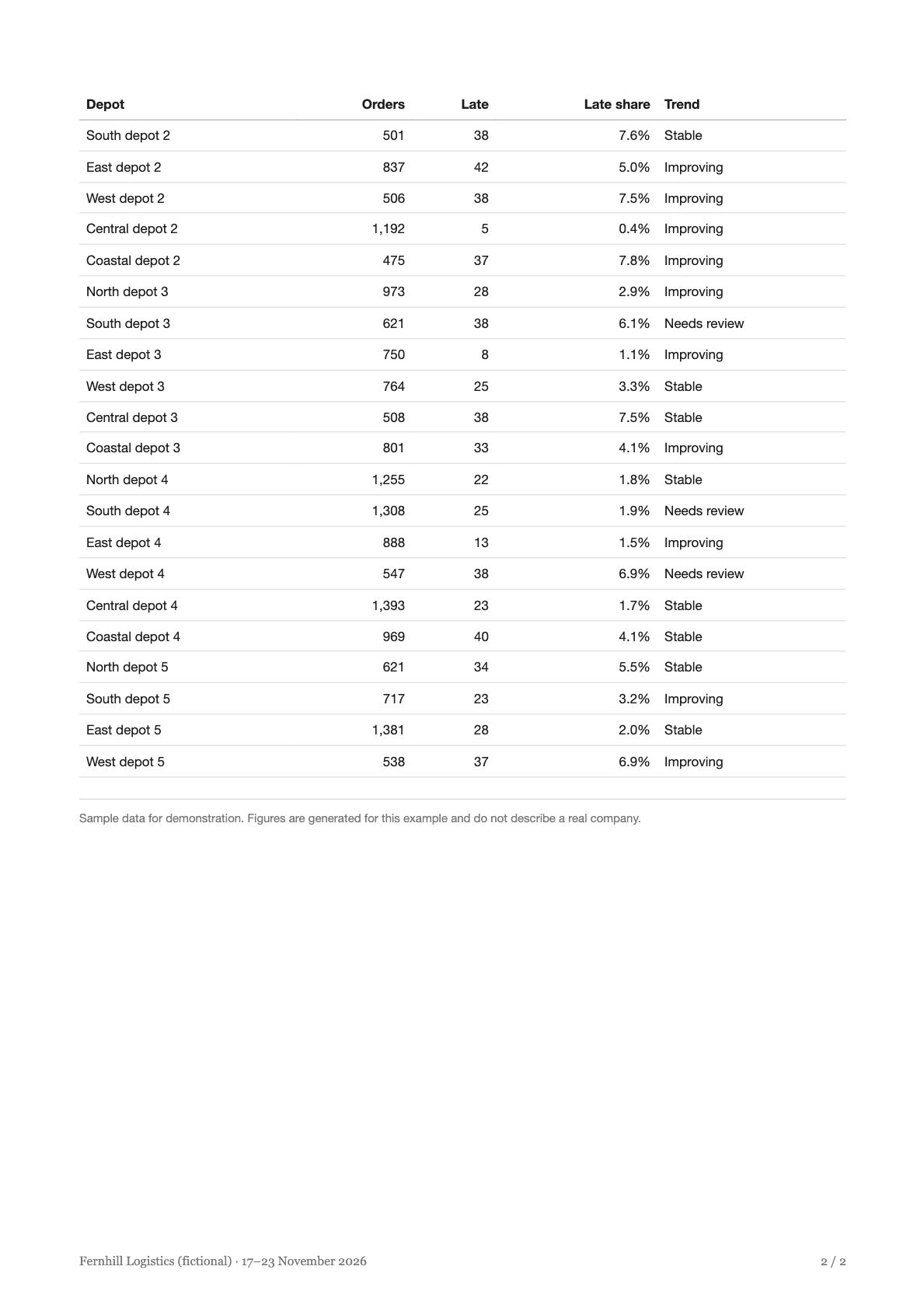
[
{
"value": "South depot 2"
},
{
"value": "501",
"numeric": true
},
{
"value": "38",
"numeric": true
},
{
"value": "7.6%",
"numeric": true
},
{
"value": "Stable"
}
],
[
{
"value": "East depot 2"
},
{
"value": "837",
"numeric": true
},
{
"value": "42",
"numeric": true
},
{
"value": "5.0%",
"numeric": true
},
{
"value": "Improving"
}
],
[
{
"value": "West depot 2"
},
{
"value": "506",
"numeric": true
},
{
"value": "38",
"numeric": true
},
{
"value": "7.5%",
"numeric": true
},
{
"value": "Improving"
}
],
[
{
"value": "Central depot 2"
},
{
"value": "1,192",
"numeric": true
},
{
"value": "5",
"numeric": true
},
{
"value": "0.4%",
"numeric": true
},
{
"value": "Improving"
}
],
[
{
"value": "Coastal depot 2"
},
{
"value": "475",
"numeric": true
},
{
"value": "37",
"numeric": true
},
{
"value": "7.8%",
"numeric": true
},
{
"value": "Improving"
}
],
[
{
"value": "North depot 3"
},
{
"value": "973",
"numeric": true
},
{
"value": "28",
"numeric": true
},
{
"value": "2.9%",
"numeric": true
},
{
"value": "Improving"
}
],
[
{
"value": "South depot 3"
},
{
"value": "621",
"numeric": true
},
{
"value": "38",
"numeric": true
},
{
"value": "6.1%",
"numeric": true
},
{
"value": "Needs review"
}
],
[
{
"value": "East depot 3"
},
{
"value": "750",
"numeric": true
},
{
"value": "8",
"numeric": true
},
{
"value": "1.1%",
"numeric": true
},
{
"value": "Improving"
}
],
[
{
"value": "West depot 3"
},
{
"value": "764",
"numeric": true
},
{
"value": "25",
"numeric": true
},
{
"value": "3.3%",
"numeric": true
},
{
"value": "Stable"
}
],
[
{
"value": "Central depot 3"
},
{
"value": "508",
"numeric": true
},
{
"value": "38",
"numeric": true
},
{
"value": "7.5%",
"numeric": true
},
{
"value": "Stable"
}
],
[
{
"value": "Coastal depot 3"
},
{
"value": "801",
"numeric": true
},
{
"value": "33",
"numeric": true
},
{
"value": "4.1%",
"numeric": true
},
{
"value": "Improving"
}
],
[
{
"value": "North depot 4"
},
{
"value": "1,255",
"numeric": true
},
{
"value": "22",
"numeric": true
},
{
"value": "1.8%",
"numeric": true
},
{
"value": "Stable"
}
],
[
{
"value": "South depot 4"
},
{
"value": "1,308",
"numeric": true
},
{
"value": "25",
"numeric": true
},
{
"value": "1.9%",
"numeric": true
},
{
"value": "Needs review"
}
],
[
{
"value": "East depot 4"
},
{
"value": "888",
"numeric": true
},
{
"value": "13",
"numeric": true
},
{
"value": "1.5%",
"numeric": true
},
{
"value": "Improving"
}
],
[
{
"value": "West depot 4"
},
{
"value": "547",
"numeric": true
},
{
"value": "38",
"numeric": true
},
{
"value": "6.9%",
"numeric": true
},
{
"value": "Needs review"
}
],
[
{
"value": "Central depot 4"
},
{
"value": "1,393",
"numeric": true
},
{
"value": "23",
"numeric": true
},
{
"value": "1.7%",
"numeric": true
},
{
"value": "Stable"
}
],
[
{
"value": "Coastal depot 4"
},
{
"value": "969",
"numeric": true
},
{
"value": "40",
"numeric": true
},
{
"value": "4.1%",
"numeric": true
},
{
"value": "Stable"
}
],
[
{
"value": "North depot 5"
},
{
"value": "621",
"numeric": true
},
{
"value": "34",
"numeric": true
},
{
"value": "5.5%",
"numeric": true
},
{
"value": "Stable"
}
],
[
{
"value": "South depot 5"
},
{
"value": "717",
"numeric": true
},
{
"value": "23",
"numeric": true
},
{
"value": "3.2%",
"numeric": true
},
{
"value": "Improving"
}
],
[
{
"value": "East depot 5"
},
{
"value": "1,381",
"numeric": true
},
{
"value": "28",
"numeric": true
},
{
"value": "2.0%",
"numeric": true
},
{
"value": "Stable"
}
],
[
{
"value": "West depot 5"
},
{
"value": "538",
"numeric": true
},
{
"value": "37",
"numeric": true
},
{
"value": "6.9%",
"numeric": true
},
{
"value": "Improving"
}
]
]
},
"sourceNote": "Sample data for demonstration. Figures are generated for this example and do not describe a real company."
}Generate this PDF
Send the HTML, or call the saved template
Two equal options with the same files and the same output. Each sample reads template.html and data.json from the current folder and expects SUBLIMEPDF_API_KEY in the environment.
HTML with data: POST /html-to-pdf
Keep the template in your repository and send it with each request. Layout changes ship with your code and go through your usual review.
import { readFile, writeFile } from "node:fs/promises";

const html = await readFile("template.html", "utf8");
const data = JSON.parse(await readFile("data.json", "utf8"));

const res = await fetch("https://api.sublimepdf.com/v1/html-to-pdf", {
  method: "POST",
  headers: {
    Authorization: `Bearer ${process.env.SUBLIMEPDF_API_KEY}`,
    "Content-Type": "application/json",
  },
  body: JSON.stringify({ html, data }),
});

if (!res.ok) throw new Error(`SublimePDF ${res.status}: ${await res.text()}`);
await writeFile("report.pdf", Buffer.from(await res.arrayBuffer()));
import json, os, requests
with open("template.html", encoding="utf-8") as f:
html = f.read()
with open("data.json", encoding="utf-8") as f:
data = json.load(f)
res = requests.post(
"https://api.sublimepdf.com/v1/html-to-pdf",
headers={"Authorization": f"Bearer {os.environ['SUBLIMEPDF_API_KEY']}"},
json={"html": html, "data": data},
timeout=60,
)
res.raise_for_status()
with open("report.pdf", "wb") as f:
f.write(res.content)curl -X POST https://api.sublimepdf.com/v1/html-to-pdf \
-H "Authorization: Bearer $SUBLIMEPDF_API_KEY" \
-H "Content-Type: application/json" \
-d "$(jq -n --rawfile html template.html --slurpfile data data.json \
'{ html: $html, data: $data[0] }')" \
--fail --output report.pdfSaved template: POST /templates/{id}/generate
Save the template in the app and send only the data with its ID. People can adjust the layout in the app without a deploy.
import { readFile, writeFile } from "node:fs/promises";

const templateId = process.env.SUBLIMEPDF_TEMPLATE_ID; // ID of the template saved in the app
const data = JSON.parse(await readFile("data.json", "utf8"));

const res = await fetch(`https://api.sublimepdf.com/v1/templates/${templateId}/generate`, {
  method: "POST",
  headers: {
    Authorization: `Bearer ${process.env.SUBLIMEPDF_API_KEY}`,
    "Content-Type": "application/json",
  },
  body: JSON.stringify({ data }),
});

if (!res.ok) throw new Error(`SublimePDF ${res.status}: ${await res.text()}`);
await writeFile("report.pdf", Buffer.from(await res.arrayBuffer()));
import json, os, requests
template_id = os.environ["SUBLIMEPDF_TEMPLATE_ID"] # ID of the template saved in the app
with open("data.json", encoding="utf-8") as f:
data = json.load(f)
res = requests.post(
f"https://api.sublimepdf.com/v1/templates/{template_id}/generate",
headers={"Authorization": f"Bearer {os.environ['SUBLIMEPDF_API_KEY']}"},
json={"data": data},
timeout=60,
)
res.raise_for_status()
with open("report.pdf", "wb") as f:
f.write(res.content)curl -X POST https://api.sublimepdf.com/v1/templates/$SUBLIMEPDF_TEMPLATE_ID/generate \
-H "Authorization: Bearer $SUBLIMEPDF_API_KEY" \
-H "Content-Type: application/json" \
-d "$(jq -n --slurpfile data data.json '{ data: $data[0] }')" \
--fail --output report.pdfTested behaviour
What this template handles
- Repeating table header
- The 28-row depot table breaks onto page 2 and its header row repeats automatically.
- Running footer
- CSS @page margin boxes print the organisation, period and “page / pages” on every page.
- Clean first page
- @page :first suppresses the left footer on the cover page.
- Headings stay with text
- break-after: avoid keeps section headings from being stranded at the bottom of a page.
- Agent-friendly shape
- Plain strings and arrays: easy to describe in a tool schema and easy for a model to fill.
- Escaped by default
- Placeholders use double braces, so text an agent writes is escaped rather than interpreted as HTML.
Make it yours
Customising the template
- Charts
- Render charts to SVG or PNG in your code and pass a hosted image URL as a field.
- More sections
- The sections array can hold any number of headings, paragraphs and bullet lists.
- Several tables
- Turn table into an array of tables if a report needs more than one.
- House style
- Change fonts and the accent colour in the CSS; the data contract stays the same.
- Paper size
- Switch @page size to Letter for US readers. While the template sets an @page size, it takes precedence over options.format.
- Sign-off block
- Add an approver field for reports a person reviews before sending.
Related
Keep going
Solution
PDF reports from apps and agents
Scheduled team reports, customer reports and agent-written reports.
Docs
Agent quickstart
Register a generate_pdf tool with any function-calling agent.
Guide
Headers, footers and page numbers
Running page furniture in HTML to PDF.
Template
Invoice template
Line items, taxes and payment terms.
Generate your first report PDF.
Send template.html with your data to the API, or save the template in the app, adjust branding and fields, and generate by template ID from your code or agent.