Reports for apps, teams and agents
PDF reports from your app, your data or your agent.
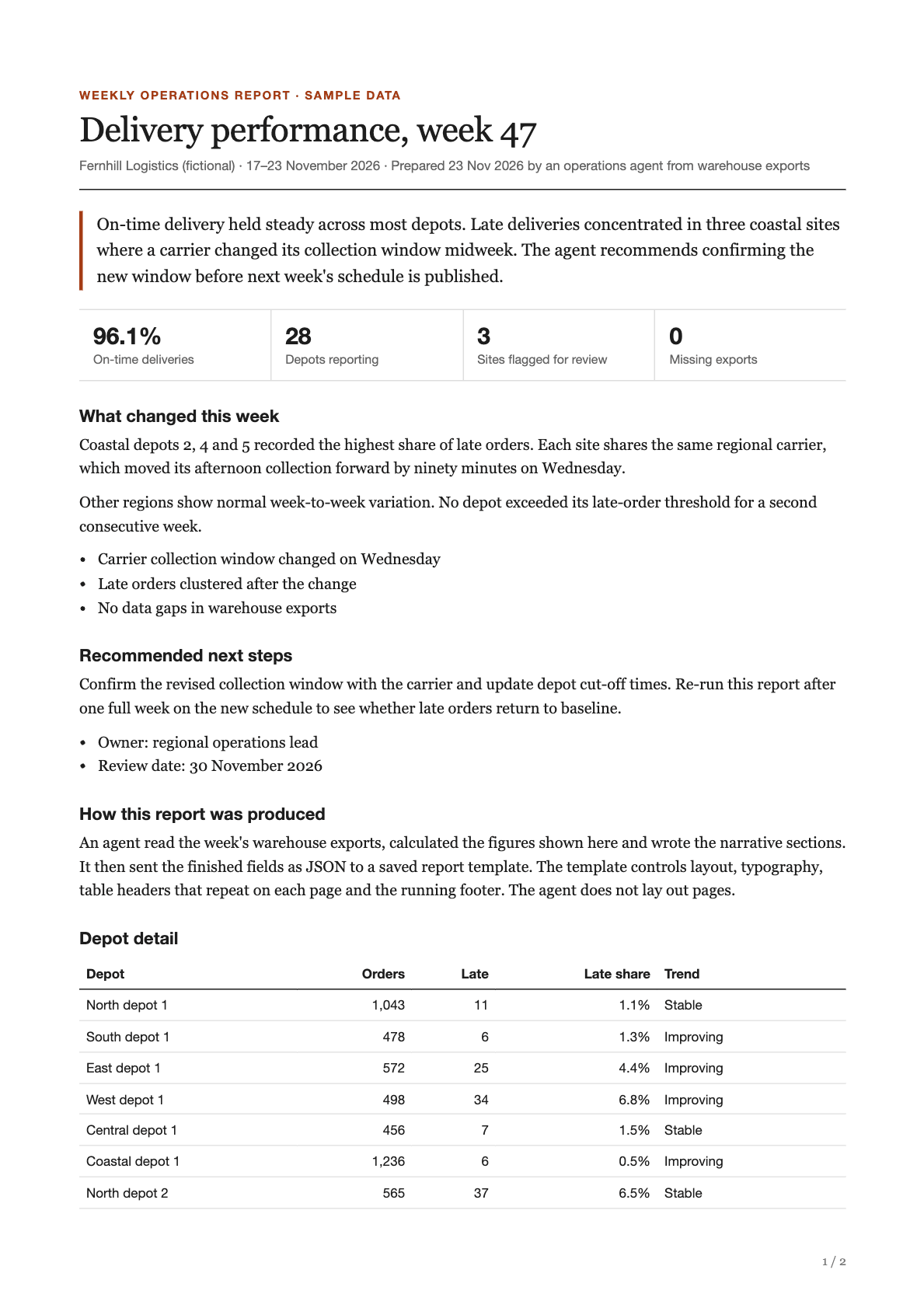
Customer statements, weekly team reports and agent-written briefings follow the same pattern. Something gathers the figures and writes the text, then sends HTML or a saved template ID with JSON to the API. SublimePDF renders the same multi-page layout every time.
Who fills the report
The same request, whoever writes the content
SublimePDF does not query your data or decide what a report says. Your code, your team's script or your agent supplies finished values; the API turns them into a PDF.
- Your app
- Monthly account statements, usage summaries or project reports for customers, generated from your database when they ask or when a period closes.
- Your team
- Weekly operations, finance or support reports built by a script from exports and queries, then filed or emailed to the people who read them.
- An AI agent
- An agent reads the inputs, writes the summary and sections, and calls a generate_pdf tool. The layout stays fixed whatever the model writes.
One report, one request
A report script you can run anywhere
Send the report HTML with its data when the layout lives in your repository. Save it as a template when people should edit it in the app; the script then sends only the data. Both produce the same PDF.
// weekly-report.mjs: render one report. Your scheduler decides when it runs.
import { readFile, writeFile } from "node:fs/promises";

// Stand-in for your own query or export: the downloadable sample data.
async function loadReportData() {
  return JSON.parse(await readFile("data.json", "utf8"));
}

const html = await readFile("template.html", "utf8");
const data = await loadReportData();
const runDate = new Date().toISOString().slice(0, 10); // e.g. 2026-11-23 (UTC)

const res = await fetch("https://api.sublimepdf.com/v1/html-to-pdf", {
  method: "POST",
  headers: {
    Authorization: `Bearer ${process.env.SUBLIMEPDF_API_KEY}`,
    "Content-Type": "application/json",
    // A re-run of the same day's job does not render a second copy.
    "Idempotency-Key": `weekly-report-${runDate}`,
  },
  body: JSON.stringify({ html, data }),
});

if (!res.ok) {
  console.error(`SublimePDF ${res.status}: ${await res.text()}`);
  process.exit(1); // a non-zero exit marks the cron job or CI run as failed
}
await writeFile(`report-${runDate}.pdf`, Buffer.from(await res.arrayBuffer()));
console.log(`Saved report-${runDate}.pdf`);
// weekly-report.mjs: the same report from a template saved in the app.
import { readFile, writeFile } from "node:fs/promises";
// Stand-in for your own query or export: the downloadable sample data.
async function loadReportData() {
return JSON.parse(await readFile("data.json", "utf8"));
}
const templateId = process.env.SUBLIMEPDF_TEMPLATE_ID; // ID of the saved report template
const data = await loadReportData();
const runDate = new Date().toISOString().slice(0, 10);
const res = await fetch(`https://api.sublimepdf.com/v1/templates/${templateId}/generate`, {
method: "POST",
headers: {
Authorization: `Bearer ${process.env.SUBLIMEPDF_API_KEY}`,
"Content-Type": "application/json",
"Idempotency-Key": `weekly-report-${runDate}`,
},
body: JSON.stringify({ data }),
});
if (!res.ok) {
console.error(`SublimePDF ${res.status}: ${await res.text()}`);
process.exit(1);
}
await writeFile(`report-${runDate}.pdf`, Buffer.from(await res.arrayBuffer()));
console.log(`Saved report-${runDate}.pdf`);The script reads template.html and data.json from the report template. Replace loadReportData() with your own query and set SUBLIMEPDF_API_KEY before running it.
Recurring reports
Bring your own scheduler
SublimePDF has no built-in scheduler. Each report is one API request, so run it from whatever already runs your recurring work.
- Cron on a server you manage.
- A job queue with repeatable or delayed jobs, if your app already has one.
- CI, such as a scheduled GitHub Actions workflow.
- Your agent platform’s scheduling, where it can run an agent on a timetable and the agent calls the PDF tool.
GitHub runs scheduled workflows in UTC unless you set a time zone, only from the default branch, and may delay them at busy times. See GitHub’s schedule event documentation.
# Edit with: crontab -e
# Runs at 07:00 every Monday. .env contains: export SUBLIMEPDF_API_KEY=...
# Use the full path to node if it is not on cron's PATH.
0 7 * * 1 cd /srv/reports && . ./.env && node weekly-report.mjs >> weekly-report.log 2>&1
# .github/workflows/weekly-report.yml
# The repository holds weekly-report.mjs, template.html and data.json.
name: Weekly report
on:
schedule:
- cron: "0 7 * * 1" # 07:00 every Monday
timezone: "Europe/London" # optional; UTC when omitted
workflow_dispatch: # lets you re-run it by hand
jobs:
report:
runs-on: ubuntu-latest
steps:
- uses: actions/checkout@v6
- uses: actions/setup-node@v7
with:
node-version: 22
- run: node weekly-report.mjs
env:
SUBLIMEPDF_API_KEY: ${{ secrets.SUBLIMEPDF_API_KEY }}
- uses: actions/upload-artifact@v4
with:
name: weekly-report
path: report-*.pdf- Name the period explicitly
- Derive the reporting period from the run date in your code, so a delayed or repeated run still reports the right week.
- One key per period
- Build the Idempotency-Key from the report name and period so re-running a job does not render a duplicate.
- Fail loudly
- Exit non-zero on an API error so cron, your queue or CI records the failure and can alert someone.
- Retry what is retryable
- Retry 429 after Retry-After and 5xx with backoff. Fix 4xx validation errors instead of retrying them.
- Store before you send
- Save each PDF in your own storage first, then email or post a link, so a delivery failure never needs a re-render.
- Watch your volume
- Batch runs for many customers should stay within your plan's requests per minute; queue them rather than firing all at once.
Agent reports
One tool call between analysis and delivery
Models are inconsistent typesetters: asked to produce a document directly, they change its structure from run to run. A fixed layout lets the model do what it is good at, finding and writing the content.
01
Agent analyses
It reads exports, tickets or metrics with your other tools and decides what the period's story is.02
Agent calls generate_pdf
It passes a saved template ID and the fields it wrote, or a complete HTML document. Your executor adds the API key and calls SublimePDF.03
Executor returns a reference
Your executor stores the PDF; the model gets a short document reference to share or attach.
Tool call emitted by the model
{
  "name": "generate_pdf",
  "arguments": {
    "template_id": "YOUR_REPORT_TEMPLATE_ID",
    "data": {
      "reportType": "Weekly operations report",
      "title": "Delivery performance, week 47",
      "organization": "Fernhill Logistics (fictional)",
      "period": "17–23 November 2026",
      "preparedOn": "23 Nov 2026",
      "preparedBy": "an operations agent",
      "summary": "On-time delivery held steady. Late orders clustered at coastal sites after a carrier changed its collection window.",
      "metrics": [
        { "value": "96.1%", "label": "On-time deliveries" },
        { "value": "3", "label": "Sites flagged for review" }
      ],
      "sections": [
        {
          "heading": "Recommended next steps",
          "paragraphs": ["Confirm the revised collection window with the carrier and update depot cut-off times."]
        }
      ],
      "table": {
        "caption": "Flagged depots",
        "columns": [{ "label": "Depot" }, { "label": "Orders", "numeric": true }, { "label": "Late", "numeric": true }],
        "rows": [
          [{ "value": "Coastal depot 2" }, { "value": "475", "numeric": true }, { "value": "37", "numeric": true }],
          [{ "value": "Coastal depot 4" }, { "value": "969", "numeric": true }, { "value": "40", "numeric": true }]
        ]
      },
      "sourceNote": "Warehouse exports, 17–23 Nov 2026 (sample data)"
    }
  }
}// generate-pdf.ts: your tool executor. It runs on your server and holds the API key.
import { mkdir, writeFile } from "node:fs/promises";
const API = "https://api.sublimepdf.com/v1";
// Comma-separated IDs of the saved templates this agent may use.
const ALLOWED_TEMPLATES = new Set((process.env.REPORT_TEMPLATE_IDS ?? "").split(",").filter(Boolean));
type GeneratePdfArgs = { template_id?: string; html?: string; data?: Record<string, unknown> };
export async function generatePdf(args: GeneratePdfArgs, callId: string) {
if (Boolean(args.template_id) === Boolean(args.html)) {
return { ok: false, error: "Provide exactly one of template_id or html." };
}
if (args.template_id && !ALLOWED_TEMPLATES.has(args.template_id)) {
return { ok: false, error: `Unknown template_id: ${args.template_id}` };
}
const url = args.template_id
? `${API}/templates/${encodeURIComponent(args.template_id)}/generate`
: `${API}/html-to-pdf`;
const body = args.template_id ? { data: args.data ?? {} } : { html: args.html, data: args.data };
const res = await fetch(url, {
method: "POST",
headers: {
Authorization: `Bearer ${process.env.SUBLIMEPDF_API_KEY}`,
"Content-Type": "application/json",
"Idempotency-Key": callId, // the model may repeat a call; this de-duplicates it
},
body: JSON.stringify(body),
});
// Return problems to the model as a result it can act on, e.g. a 422 naming a field.
if (!res.ok) return { ok: false, status: res.status, error: await res.text() };
await mkdir("reports", { recursive: true });
const file = `reports/${callId.replace(/[^A-Za-z0-9_-]/g, "_")}.pdf`;
await writeFile(file, Buffer.from(await res.arrayBuffer()));
return { ok: true, document: file }; // a reference, not raw bytes
}# generate_pdf.py: your tool executor. It runs on your server and holds the API key.
import os
import re
import requests
API = "https://api.sublimepdf.com/v1"
# Comma-separated IDs of the saved templates this agent may use.
ALLOWED_TEMPLATES = set(filter(None, os.environ.get("REPORT_TEMPLATE_IDS", "").split(",")))
def generate_pdf(args: dict, call_id: str) -> dict:
template_id, html, data = args.get("template_id"), args.get("html"), args.get("data")
if bool(template_id) == bool(html):
return {"ok": False, "error": "Provide exactly one of template_id or html."}
if template_id and template_id not in ALLOWED_TEMPLATES:
return {"ok": False, "error": f"Unknown template_id: {template_id}"}
if template_id:
url, body = f"{API}/templates/{template_id}/generate", {"data": data or {}}
else:
url, body = f"{API}/html-to-pdf", {"html": html, "data": data}
res = requests.post(
url,
headers={
"Authorization": f"Bearer {os.environ['SUBLIMEPDF_API_KEY']}",
"Idempotency-Key": call_id,
},
json=body,
timeout=60,
)
if not res.ok:
return {"ok": False, "status": res.status_code, "error": res.text}
os.makedirs("reports", exist_ok=True)
path = os.path.join("reports", re.sub(r"[^A-Za-z0-9_-]", "_", call_id) + ".pdf")
with open(path, "wb") as f:
f.write(res.content)
return {"ok": True, "document": path}The tool definition and the agent loop that calls this executor are in the agent quickstart. Any function-calling model API works; MCP is an optional alternative.
Guardrails
Keep the agent on a short leash
A PDF tool is low risk when it is designed well. These are the defaults we recommend.
- Allow-list templates
- Let the executor accept only the template IDs this agent should use, rather than any ID the model invents.
- Validate before rendering
- Check the data against the template’s field list and return validation errors to the model as a tool result.
- Never expose the key
- The API key lives in the executor’s environment. It is never part of a prompt, a tool result or a client bundle.
- Escape model text
- Use double-brace placeholders so anything the model writes is escaped instead of interpreted as HTML.
- Idempotent calls
- Use the tool call ID as the Idempotency-Key so a repeated call does not create a second report.
- Human review where it matters
- Route reports to a person before sending them outside your organisation.
Build it
Report resources
Template
Report template
Field list, HTML source, sample data and the 2-page PDF behind this page.
Docs
Agent quickstart
Register generate_pdf with any function-calling framework.
Guide
Headers, footers and page numbers
Running footers and page counters for multi-page reports.
Guide
Error handling and retries
Which errors to retry, and how to return them to a model.
Product
HTML to PDF API
Rendering options, page sizes and how the API fits your stack.
Docs
MCP connection (optional)
Expose the same tool to MCP clients if you use them.
Turn your next report into a PDF.
Create an API key, run the report script once by hand, then hand it to your scheduler or give your agent the generate_pdf tool.