Invoice PDF API
Invoice PDFs from your order and billing data.
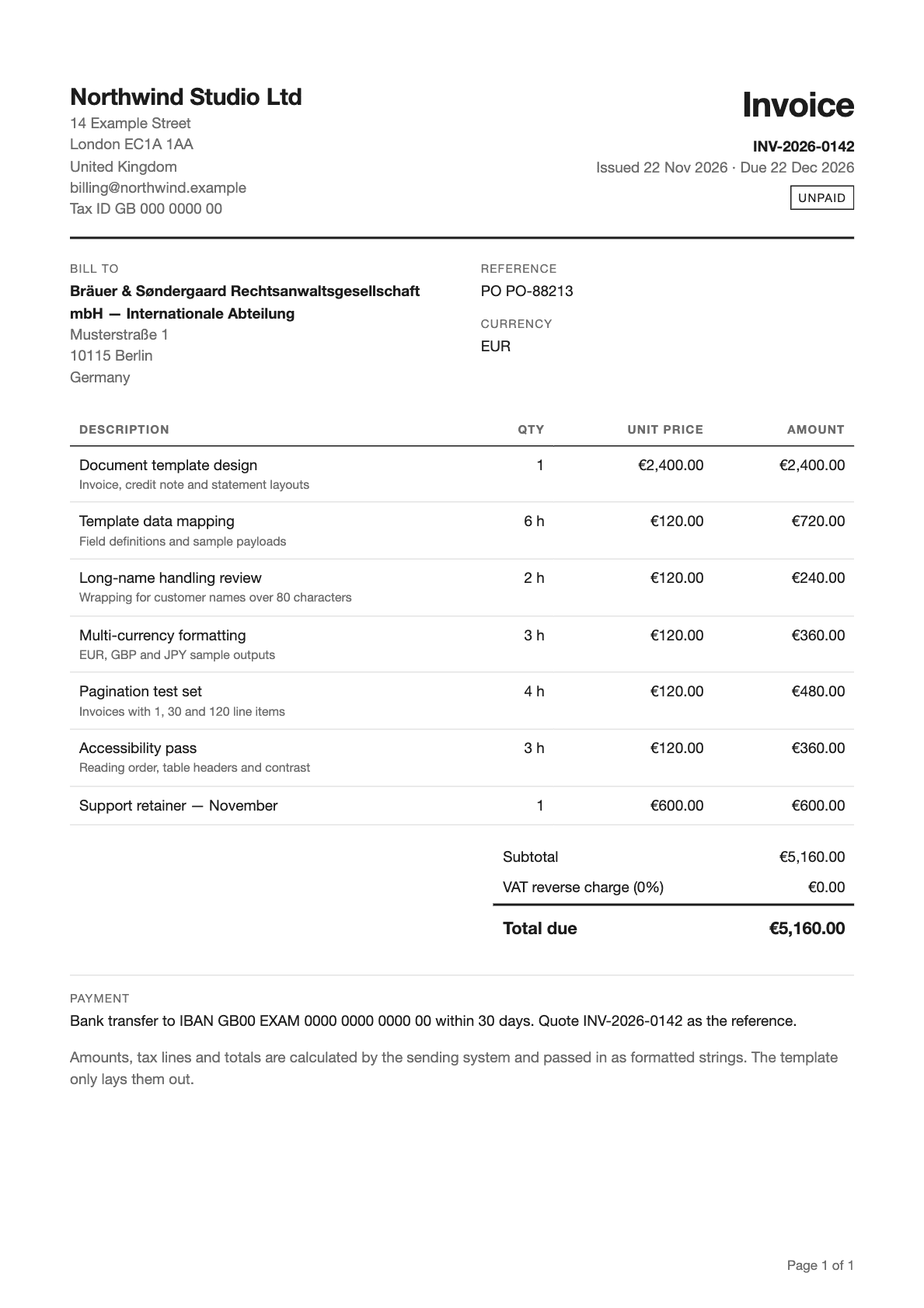
Generate one invoice PDF for every order, renewal or credit note. Send your invoice HTML with the record's data, or save the layout as a template in the app and send only the data. Your system stays the source of truth for every number.
Before you design
What an invoice PDF needs
Tax authorities decide what a valid invoice must show, and the rules differ by country and by whether you charge sales tax or VAT. Check the rules for every place you bill.
For UK businesses, for example, HMRC lists the details an invoice must include, with further details for VAT invoices: Invoices: what they must include (GOV.UK).
- A unique invoice number
- Allocated once by your system, in sequence, and never reused or changed after the invoice is issued.
- Seller details
- Your business name, address and contact details, plus a tax registration number where you are registered.
- Customer details
- The customer's name and billing address, exactly as held in your records. Long legal names must wrap cleanly.
- Dates
- The invoice date and due date, and a supply date where it differs from the invoice date. The sample template has no supply-date field; add one if you need it.
- Line items
- A clear description of each product or service with quantity, unit price and line amount.
- Tax, totals and currency
- Each tax line, the subtotal and the total owed, already calculated and formatted in the invoice currency.
- Payment terms
- How and by when to pay, and the reference the customer should quote.
- Optional references
- Purchase order numbers, account IDs or notes, shown only when present.
The flow
One PDF per billing event
Generate the PDF when an invoice becomes final, not while it is a draft. Trigger it from the code that already handles the event: a checkout handler, a webhook from your billing provider or a job on your queue.
01
An event closes an invoice
An order is paid, a subscription renews or a refund needs a credit note. Your system allocates the number and fixes line items, tax and totals.02
Map the record to data
Format amounts and dates for the customer's locale and build the JSON your invoice layout expects.03
Generate once, then store
Call the API with an idempotency key derived from the invoice number. Store the PDF, then email it, attach it or show it in the customer's account.
Who does what
SublimePDF renders. Your system does the accounting.
Invoices carry legal and tax meaning. Keep every calculation in the system that owns it and treat the layout as presentation only.
- Your billing system
- Invoice numbering and sequencing
- Prices, quantities and discounts
- Tax rates, tax lines and totals
- Currency, rounding and locale formatting
- Legal wording for your jurisdictions
- Your invoice layout
- Branding and typography
- Line-item tables that span pages
- Optional blocks such as notes or PO numbers
- Page numbers and paper size
- Printing values exactly as sent
Implementation
Map the record, then send HTML or a template ID
Both requests produce the same PDF from the same data. Send the HTML when the layout lives in your repository and ships with your code. Save it as a template when people should edit it in the app without a deploy; your code then sends only the data.
// map-invoice.mjs: turn one billing record into the invoice template's data.
// The record is fictional; in production it comes from your billing system.
import { writeFile } from "node:fs/promises";

const record = {
  number: "INV-2026-0143", // allocated by your numbering sequence
  issuedAt: "2026-11-23",
  dueAt: "2026-12-23",
  currency: "GBP",
  locale: "en-GB",
  customer: { name: "Example Customer Ltd", address: ["1 Sample Road", "Leeds LS1 1AA", "United Kingdom"] },
  lines: [
    { description: "Pro plan, monthly", quantity: 1, unitAmount: 4900 }, // minor units (pence)
    { description: "Additional seats", quantity: 3, unitAmount: 900 },
  ],
  taxLabel: "VAT 20%",
  taxRate: 0.2, // decided by your tax logic, never by the template
};

const money = new Intl.NumberFormat(record.locale, { style: "currency", currency: record.currency });
const date = new Intl.DateTimeFormat(record.locale, { day: "numeric", month: "short", year: "numeric", timeZone: "UTC" });
const major = (minor) => minor / 100; // two-decimal currencies only; JPY, for example, has none

const lines = record.lines.map((line) => ({ ...line, amount: line.unitAmount * line.quantity }));
const subtotal = lines.reduce((sum, line) => sum + line.amount, 0);
const tax = Math.round(subtotal * record.taxRate);

const data = {
  seller: {
    name: "Northwind Studio Ltd",
    address: ["14 Example Street", "London EC1A 1AA", "United Kingdom"],
    email: "billing@northwind.example",
  },
  customer: record.customer,
  invoice: {
    number: record.number,
    issueDate: date.format(new Date(record.issuedAt)),
    dueDate: date.format(new Date(record.dueAt)),
    currency: record.currency,
    status: "Unpaid",
  },
  items: lines.map((line) => ({
    description: line.description,
    quantity: String(line.quantity),
    unitPrice: money.format(major(line.unitAmount)),
    amount: money.format(major(line.amount)),
  })),
  totals: {
    subtotal: money.format(major(subtotal)),
    taxes: [{ label: record.taxLabel, amount: money.format(major(tax)) }],
    total: money.format(major(subtotal + tax)),
  },
  payment: { instructions: `Bank transfer within 30 days. Quote ${record.number} as the reference.` },
};

await writeFile("data.json", JSON.stringify(data, null, 2));
// generate-invoice.mjs: send the invoice HTML and its data in one request.
import { readFile, writeFile } from "node:fs/promises";
const html = await readFile("template.html", "utf8");
const data = JSON.parse(await readFile("data.json", "utf8"));
const res = await fetch("https://api.sublimepdf.com/v1/html-to-pdf", {
method: "POST",
headers: {
Authorization: `Bearer ${process.env.SUBLIMEPDF_API_KEY}`,
"Content-Type": "application/json",
// One key per invoice: retrying after a timeout does not render a second copy.
"Idempotency-Key": `invoice-${data.invoice.number}`,
},
body: JSON.stringify({ html, data }),
});
// 400, 401, 413 and 422: fix the request. 429 and 5xx: retry later with the same key.
if (!res.ok) throw new Error(`SublimePDF ${res.status}: ${await res.text()}`);
await writeFile(`${data.invoice.number}.pdf`, Buffer.from(await res.arrayBuffer()));// generate-invoice.mjs: the same invoice from a template saved in the app.
import { readFile, writeFile } from "node:fs/promises";
const templateId = process.env.SUBLIMEPDF_TEMPLATE_ID; // ID of the saved invoice template
const data = JSON.parse(await readFile("data.json", "utf8"));
const res = await fetch(`https://api.sublimepdf.com/v1/templates/${templateId}/generate`, {
method: "POST",
headers: {
Authorization: `Bearer ${process.env.SUBLIMEPDF_API_KEY}`,
"Content-Type": "application/json",
"Idempotency-Key": `invoice-${data.invoice.number}`,
},
body: JSON.stringify({ data }),
});
// 404 means the template ID is not in this workspace; 422 means the data failed validation.
if (!res.ok) throw new Error(`SublimePDF ${res.status}: ${await res.text()}`);
await writeFile(`${data.invoice.number}.pdf`, Buffer.from(await res.arrayBuffer()));Save the files as .mjs and run them with SUBLIMEPDF_API_KEY set. Step 2 reads template.html and the data.json written by step 1, or the sample data.json if you skip it.
In production
Details that matter for invoices
- No duplicates on retry
- Derive the Idempotency-Key from the invoice number so a retried request does not create a second document.
- Bulk runs within limits
- Month-end batches should respect your plan's requests per minute; queue jobs and honour Retry-After on 429.
- Long invoices
- In our sample render, the invoice layout paginates a 60-line invoice across 4 pages with the table header repeated.
- Keep the PDF you sent
- Store each generated invoice in your own storage so you can resend exactly what the customer received.
- Credit notes and statements
- Copy the layout for related documents and reuse the same data mapping.
- Agents can send invoices too
- An agent can call the same endpoint through a tool, while your code still owns the numbers.
Next steps
Build it
Template
Invoice template
Field list, HTML source, sample data and the rendered PDFs.
Product
HTML to PDF API
Rendering options, page sizes and how the API fits your stack.
Tutorial
Generate PDFs from HTML templates and JSON
Step-by-step tutorial from API key to stored file.
Guide
Error handling and retries
Which errors to retry and how.
Guide
Template variables
Placeholders, loops and conditionals for line items and optional fields.
Article
PDF workflows for small business
Where generated invoices fit with signing, forms and archiving.
Send your first invoice PDF today.
Create an API key, map one billing record and generate the PDF from your code, as HTML with data or from a saved template.