Template
HTML invoice template
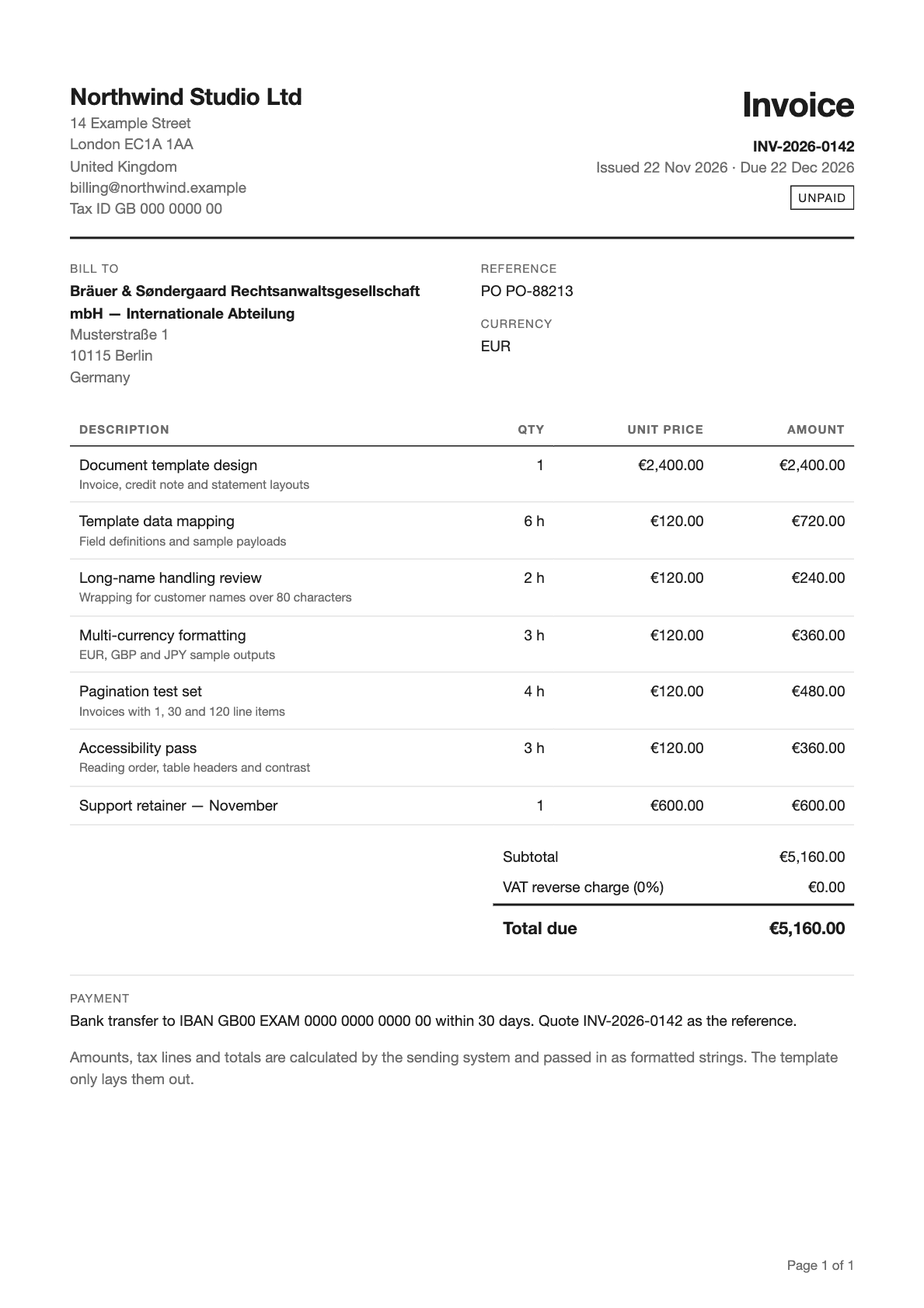
A clean A4 invoice with seller and customer blocks, line items, tax lines and payment terms. Send it to the API with each billing record, or save it in the app and generate invoices by template ID.
Files
Template, data and output
Download the exact files behind the preview. Send template.html with data.json straight to the API, save the template in the app to adapt it, or use the files as test fixtures with any renderer.
- Invoice templateHTML and CSS, 93 lines
- Sample dataJSON, 7 line items, EUR
- Rendered invoicePDF, 1 page
- Long sample dataJSON, 60 line items, JPY
- Rendered long invoicePDF, 4 pages
Sample outputs were rendered from these files with headless Chromium for documentation. All names and figures are fictional.
template.html — line items
<table>
  <thead>
    <tr><th>Description</th><th class="num">Qty</th>
        <th class="num">Unit price</th><th class="num">Amount</th></tr>
  </thead>
  <tbody>
    {{#each items}}
    <tr>
      <td class="desc">{{description}}{{#if detail}}<small>{{detail}}</small>{{/if}}</td>
      <td class="num">{{quantity}}</td>
      <td class="num">{{unitPrice}}</td>
      <td class="num">{{amount}}</td>
    </tr>
    {{/each}}
  </tbody>
</table>
Data contract
Fields the template expects
Values arrive as already-formatted strings: your system, script or agent calculates figures, totals and dates, and the template lays them out. The same data works whether you send the HTML or call a saved template.
| Field | Type | Required | Notes |
|---|---|---|---|
| seller.name | string | Yes | Your company name, shown as the letterhead. |
| seller.address | string[] | Yes | One array item per address line. |
| seller.email | string | Yes | Billing contact shown under the address. |
| seller.taxId | string | No | Hidden when omitted. |
| customer.name | string | Yes | Wraps inside the bill-to block; the samples use 77- and 105-character names. |
| customer.address | string[] | Yes | One array item per line. |
| invoice.number | string | Yes | Also used in the document title. |
| invoice.issueDate / dueDate | string | Yes | Pre-formatted for the customer's locale. |
| invoice.currency | string | Yes | Display only; amounts are already formatted. |
| invoice.purchaseOrder | string | No | Shows a dash when omitted. |
| invoice.status | string | No | Badge such as Unpaid, Paid or Draft. |
| items[] | object[] | Yes | description, optional detail, quantity, unitPrice, amount. |
| totals.subtotal / total | string | Yes | Calculated by your system. |
| totals.taxes[] | object[] | Yes | label and amount per tax line; can be empty. |
| payment.instructions | string | Yes | Bank details or a payment link description. |
| notes | string | No | Optional footnote below the payment block. |
data.json
{
  "seller": {
    "name": "Northwind Studio Ltd",
    "address": ["14 Example Street", "London EC1A 1AA", "United Kingdom"],
    "email": "billing@northwind.example",
    "taxId": "GB 000 0000 00"
  },
  "customer": {
    "name": "Bräuer & Søndergaard Rechtsanwaltsgesellschaft mbH — Internationale Abteilung",
    "address": ["Musterstraße 1", "10115 Berlin", "Germany"]
  },
  "invoice": {
    "number": "INV-2026-0142",
    "issueDate": "22 Nov 2026",
    "dueDate": "22 Dec 2026",
    "currency": "EUR",
    "purchaseOrder": "PO-88213",
    "status": "Unpaid"
  },
  "items": [
    { "description": "Document template design", "detail": "Invoice, credit note and statement layouts", "quantity": "1", "unitPrice": "€2,400.00", "amount": "€2,400.00" },
    { "description": "Template data mapping", "detail": "Field definitions and sample payloads", "quantity": "6 h", "unitPrice": "€120.00", "amount": "€720.00" },
    { "description": "Long-name handling review", "detail": "Wrapping for customer names over 80 characters", "quantity": "2 h", "unitPrice": "€120.00", "amount": "€240.00" },
    { "description": "Multi-currency formatting", "detail": "EUR, GBP and JPY sample outputs", "quantity": "3 h", "unitPrice": "€120.00", "amount": "€360.00" },
    { "description": "Pagination test set", "detail": "Invoices with 1, 30 and 120 line items", "quantity": "4 h", "unitPrice": "€120.00", "amount": "€480.00" },
    { "description": "Accessibility pass", "detail": "Reading order, table headers and contrast", "quantity": "3 h", "unitPrice": "€120.00", "amount": "€360.00" },
    { "description": "Support retainer — November", "quantity": "1", "unitPrice": "€600.00", "amount": "€600.00" }
  ],
  "totals": {
    "subtotal": "€5,160.00",
    "taxes": [{ "label": "VAT reverse charge (0%)", "amount": "€0.00" }],
    "total": "€5,160.00"
  },
  "payment": {
    "instructions": "Bank transfer to IBAN GB00 EXAM 0000 0000 0000 00 within 30 days. Quote INV-2026-0142 as the reference."
  },
  "notes": "Amounts, tax lines and totals are calculated by the sending system and passed in as formatted strings. The template only lays them out."
}
Generate this PDF
Send the HTML, or call the saved template
Two equal options with the same files and the same output. Each sample reads template.html and data.json from the current folder and expects SUBLIMEPDF_API_KEY in the environment.
HTML with data: POST /html-to-pdf
Keep the template in your repository and send it with each request. Layout changes ship with your code and go through your usual review.
import { readFile, writeFile } from "node:fs/promises";

const html = await readFile("template.html", "utf8");
const data = JSON.parse(await readFile("data.json", "utf8"));

const res = await fetch("https://api.sublimepdf.com/v1/html-to-pdf", {
  method: "POST",
  headers: {
    Authorization: `Bearer ${process.env.SUBLIMEPDF_API_KEY}`,
    "Content-Type": "application/json",
  },
  body: JSON.stringify({ html, data }),
});

if (!res.ok) throw new Error(`SublimePDF ${res.status}: ${await res.text()}`);
await writeFile("invoice.pdf", Buffer.from(await res.arrayBuffer()));
import json, os, requests
with open("template.html", encoding="utf-8") as f:
html = f.read()
with open("data.json", encoding="utf-8") as f:
data = json.load(f)
res = requests.post(
"https://api.sublimepdf.com/v1/html-to-pdf",
headers={"Authorization": f"Bearer {os.environ['SUBLIMEPDF_API_KEY']}"},
json={"html": html, "data": data},
timeout=60,
)
res.raise_for_status()
with open("invoice.pdf", "wb") as f:
f.write(res.content)curl -X POST https://api.sublimepdf.com/v1/html-to-pdf \
-H "Authorization: Bearer $SUBLIMEPDF_API_KEY" \
-H "Content-Type: application/json" \
-d "$(jq -n --rawfile html template.html --slurpfile data data.json \
'{ html: $html, data: $data[0] }')" \
--fail --output invoice.pdfSaved template: POST /templates/{id}/generate
Save the template in the app and send only the data with its ID. People can adjust the layout in the app without a deploy.
import { readFile, writeFile } from "node:fs/promises";

const templateId = process.env.SUBLIMEPDF_TEMPLATE_ID; // ID of the template saved in the app
const data = JSON.parse(await readFile("data.json", "utf8"));

const res = await fetch(`https://api.sublimepdf.com/v1/templates/${templateId}/generate`, {
  method: "POST",
  headers: {
    Authorization: `Bearer ${process.env.SUBLIMEPDF_API_KEY}`,
    "Content-Type": "application/json",
  },
  body: JSON.stringify({ data }),
});

if (!res.ok) throw new Error(`SublimePDF ${res.status}: ${await res.text()}`);
await writeFile("invoice.pdf", Buffer.from(await res.arrayBuffer()));
import json, os, requests
template_id = os.environ["SUBLIMEPDF_TEMPLATE_ID"] # ID of the template saved in the app
with open("data.json", encoding="utf-8") as f:
data = json.load(f)
res = requests.post(
f"https://api.sublimepdf.com/v1/templates/{template_id}/generate",
headers={"Authorization": f"Bearer {os.environ['SUBLIMEPDF_API_KEY']}"},
json={"data": data},
timeout=60,
)
res.raise_for_status()
with open("invoice.pdf", "wb") as f:
f.write(res.content)curl -X POST https://api.sublimepdf.com/v1/templates/$SUBLIMEPDF_TEMPLATE_ID/generate \
-H "Authorization: Bearer $SUBLIMEPDF_API_KEY" \
-H "Content-Type: application/json" \
-d "$(jq -n --slurpfile data data.json '{ data: $data[0] }')" \
--fail --output invoice.pdfTested behaviour
What this template handles
- Long customer names
- The samples use a 77-character German legal name with accented characters and a 105-character Japanese and English name. Both wrap inside the bill-to block.
- Multi-page item lists
- The 60-line sample produces a 4-page PDF; the table header repeats on each page and rows are not split.
- Any currency
- Amounts are passed pre-formatted, so they print exactly as your billing system formats them. The samples cover EUR and JPY.
- Optional fields
- Tax ID, purchase order, status badge and notes disappear cleanly when you leave them out.
- Page numbers
- A footer shows the page number and total so multi-page invoices stay in order.
- No arithmetic in the template
- Totals and taxes come from your system, so the PDF always matches your ledger.
Make it yours
Customising the template
- Branding
- Swap the letterhead text for your logo with an <img> pointing at a hosted file, and change colours and fonts in the CSS.
- Paper size
- Change @page size from A4 to Letter in the template. While the template sets an @page size, it takes precedence over options.format.
- Extra columns
- Add fields to each item object and a matching table column. Keep the data contract documented for your team.
- Credit notes
- Duplicate the template, change the heading and status, and reuse the same data shape.
- Localisation
- Translate the fixed labels in the template; dates and amounts already arrive formatted.
- Validation
- Validate the payload against the field table before calling the API so missing fields fail fast in your code.
Generate your first invoice PDF.
Send template.html with your data to the API, or save the template in the app, adjust branding and fields, and generate by template ID from your code or agent.